




Claim Page 01 – Correcting an NOTR (8XB)
To correct a date on a previously submitted notice of termination/revocation (NOTR) in the Fiscal Intermediary Standard System (FISS) Direct Data Entry (DDE) system:
- Select '02' (Claims/Attachments).
- Select '49' (NOE/NOA).
- Key the required data elements on claim pages 01 and 03.
Below is an image of the FISS DDE claim page 01 (MAP1711) screen.
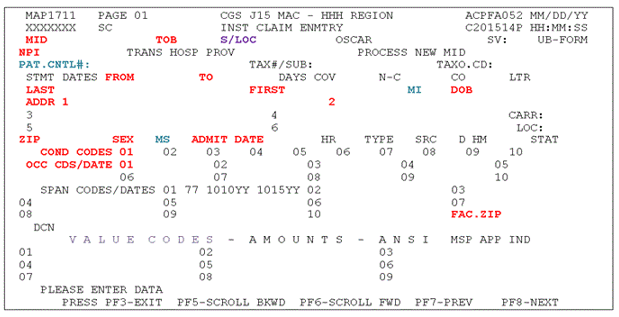
Key:
- RED = Required
- BLUE = Optional
- PURPLE = Auto-populated
- BLACK = Not required
Field Descriptions
The table below describes the required data elements for each DDE field or UB-04 Form Locator.
DDE Field |
UB-04 Form Locator (FL) |
Description |
|---|---|---|
MID |
FL 60 |
Medicare ID Enter the beneficiary's Medicare ID number. |
TOB |
FL 4 |
Type of Bill Enter 81B (Non-hospital based) or 82B (Hospital based). |
NPI |
FL 56 |
National Provider Identifier Enter the hospice's NPI number. |
STMT DATES FROM/TO |
FL 6 |
FROM Date Enter the start date of the hospice benefit period in which the discharge/revocation is effective. Example: The benefit period in which the discharge/revocation occurred is 04/16/YY to 06/14/YY. The revocation effective date is 05/31/YY. The FROM date is 04/16/YY. Note: If the beneficiary transferred to your hospice during the benefit period, report the date of transfer. TO Date Enter the correct discharge/revocation effective date. Note: If the original NOTR was submitted entirely in error, enter zeroes. |
LAST |
FL 8 |
Last Name Enter the beneficiary's last name exactly as it appears on the Medicare card or eligibility file. |
FIRST |
FL 8 |
First Name Enter the beneficiary's first name exactly as it appears on the Medicare card or eligibility file. |
DOB |
FL 9 |
Date of Birth Enter the beneficiary's date of birth. |
ADDR |
FL 9 |
Address Enter the beneficiary's full mailing address, including street name and number, post office box number or RFD, city and state. |
ZIP |
FL 9 |
ZIP Code Enter the beneficiary's ZIP code. |
SEX |
FL 11 |
Sex Enter the beneficiary's sex (M = Male or F = Female). |
ADMIT DATE |
FL 12 |
Admission Date Enter the start date of the hospice election period in which the discharge or revocation is effective (i.e., the "FROM" date submitted on the NOE TOB 8XA). If the beneficiary transferred after electing the Medicare hospice benefit, enter the Start Date 2 of the benefit period in which the patient transferred (i.e., the "FROM" date submitted on the Notice of Change TOB 8XC). If a Notice of Change of Ownership TOB 8XE was billed, the "FROM" date should match the date on the 8XE. |
COND CODES |
FL 18-28 |
Condition Codes Enter D0 (zero) – Change to service dates. |
OCC CDS/Date |
FL 31-34 |
Occurrence Codes Enter 56 and the incorrect discharge/revocation date reported on the original NOTR. |
FAC.ZIP |
FL 1 |
Facility ZIP Code Enter the hospice's 9-digit ZIP code. |
See Claim Page 03 – Entering a Notice of Termination/Revocation – NOTR (8XB) for additional required data elements.
Updated: 08.13.2025
 Join Electronic Mailing List
 Print
Print Bookmark
 Facebook
 YouTube
 LinkedIn
 CGS Medicare Mobile App