




AUTOMATED REOPENINGS:

Form DOS 568 (Date of Service Adjustment Request Form) will allow you to change the date of service of line items on a previously processed claim.
Only one claim can be corrected per form; up to 12 line items per claim.
NOTE: In order to complete the form accurately, you must have access to your Remittance Advice (RA). If you download your RA from a billing service or clearinghouse, the line items may be in a different sequence, which will affect the processing on this form. We suggest accessing your RA directly from the myCGS® Web Portal.
Also, to avoid issues with legibility, we encourage you to complete the form online, and then print it.
Automated Reopenings Date of Service Adjustment Request Form Instructions
- Complete the Header of the form:

- Select the State
- Enter the date the form is completed in the XX-XX-XXXX format
- Enter a contact person's name and telephone number
- NOTE: This information is important should we need to contact you with a question regarding your Reopening request.
- Complete the Provider Information section:

- Identify the last 5 digits of Tax ID number
- Enter the Billing PTAN
- Individual physicians/practitioners who reassign benefits to a group, enter the Group PTAN.
- Solo physicians/practitioners, enter the Individual PTAN.
- Enter the Billing NPI
- Individual physicians/practitioners who reassign benefits to a group, enter the Group NPI.
- Solo physicians/practitioners, enter the Individual NPI.
- Complete the Beneficiary Information section:

- Enter the Beneficiary's Name
- Enter the Beneficiary's Medicare ID
- To avoid processing delays, please verify that the Medicare ID is correct.
- Identify the claim information:

- Enter a Date of Service from the claim.
- Identify a HCPCS/CPT code (procedure code) that corresponds to the date of service.
- Enter the Internal Control Number (ICN) of the claim, which is located on the RA.
- Verify that the ICN is accurate. Incorrect, incomplete, or invalid ICNs will result in increased processing time (up to 60 days).
- Complete each column of the Adjustment Details section using information from the RA:

- Identify the Line you wish to have corrected.
- For example, if the RA shows the claim was submitted with nine line items, and the correction is needed on line six of the claim, enter '6'. (A value of 1-13 may be entered in this field.)
- Complete the From Date of Service (DOS) New Value field to update the beginning date the service was rendered. Must be in the XX-XX-XXXX format.
- Complete the To Date of Service (DOS) New Value field to update the end date the service was rendered. Must be in the XX-XX-XXXX format.
- For example: Original claim submitted with date of service 08/01/19 for CPT code 11042.
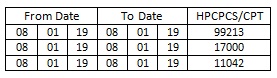
- For example: Original claim submitted with date of service 08/01/19 for CPT code 11042.

- Identify the Line you wish to have corrected.
Please pay special attention to the Adjustment Details section. Forms submitted with inaccurate, incomplete, or missing Line and/or New Values may result in increased processing time of up to 60 days.
 Join Electronic Mailing List
 Print
Print Bookmark
 Facebook
 YouTube
 LinkedIn
 CGS Medicare Mobile App