


September 11, 2026
myCGS® DME 12.0 – CGS Connect® Available Now!
Great news! We released myCGS 12 on September 10 and it introduces a new feature – CGS Connect.
CGS Connect is a voluntary program that provides suppliers with a professional review of pre-claim documentation before submitting a claim to Medicare.
You can now submit CGS Connect requests through myCGS and check the status of these requests.
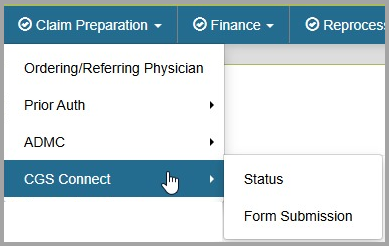
Claim Preparation Menu
You can find CGS Connect under the Claim Preparation Menu in myCGS.
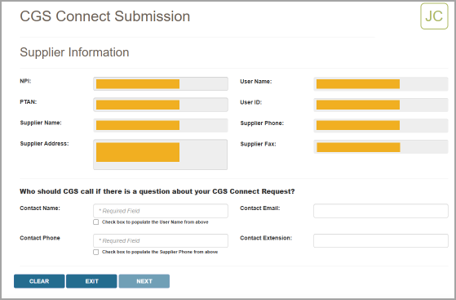
CGS Connect Submission Screen
This screen guides you through a step-by-step process to submit requests to Jurisdiction B or C. CGS Connect submission makes it simple to submit all the information you need, ensuring a decision will be completed as quickly as possible while reducing the chances that the request will be rejected.
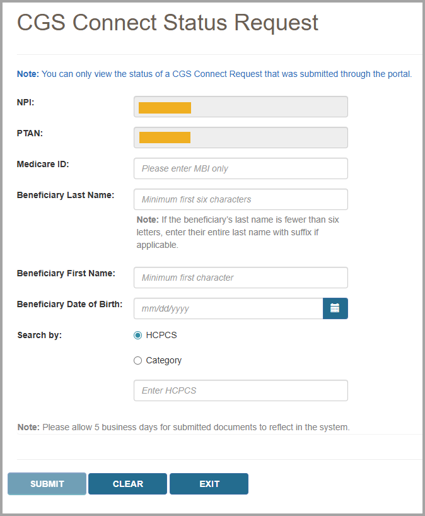
CGS Connect Status Request Screen
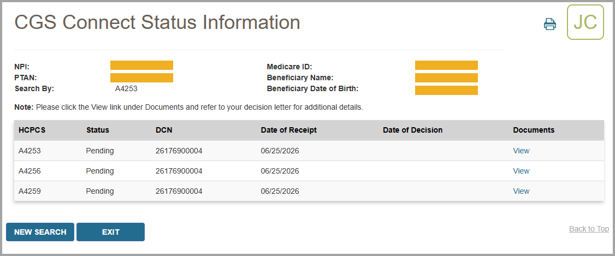
This screen lets you view the status of any CGS Connect request you've submitted through the portal to Jurisdiction B or C. After searching for your request, you can view detailed information about your request. This includes any related documents such as your submitted documentation and the CGS Connect decision letter (when available).
Need help?
- See Chapter 5 of the myCGS User Manual for detailed instructions.
- Not registered for myCGS? See our myCGS Registration and Account Management Guide for instructions on how to register.
We'd love your feedback!
Your feedback made this exciting update possible.
When a survey pops up on our website (like the one below), please take a moment to share your thoughts. Your input helps us improve and serve you better!

 Join Electronic Mailing List
 Print
Print Bookmark
 Facebook
 YouTube
 LinkedIn
 CGS Medicare Mobile App