




MCReF & More
The Medicare Cost Report Electronic Filing (MCReF) system is a secure CMS portal that allows providers to electronically submit their Medicare Cost Report (MCR) package to their Medicare Administrative Contractor (MAC). Since inception, and with provider input, CMS updates MCReF with new functionalities to assist providers. MCReF currently offers the following services:
e-File Cost Reports:
- Providers can electronically submit (file) their cost report and MCR materials.
- When e-filing, from the user's dashboard, upload all corresponding MCR materials as attachments, and submit them directly to your MAC.
- The MCReF system performs a basic review of the attached materials to determine if the MCR is “receivable”.
- If issues are identified, the provider will immediately receive an error/warning message.
- If no issues are identified, the provider will receive a confirmation number and electronic postmark date to use in correspondence related to the submission. MACs will complete the acceptability review within 30 days and notify the provider of the result, including a rejection letter if the cost report is rejected.
- If using the optional electronic specifications/templates for cost report exhibits, providers will receive upfront, live notice of potential issues with those exhibits, and may receive instant notice of acceptance.
- Please review MCReF Cost Report Submissions for more information.
Review Cost Report Status & Important Letters:
- Providers can review the status of their cost report settlements across all fiscal years dating back to 2010 on the MCReF Homepage Cost Report Dashboard.
- Providers can also view a detailed status tracker for each year, including access to MAC-supplied documentation for Interim Rates, Tentative Settlements, and Notices of Program Reimbursement and Revised Notices of Program Reimbursement.
Download One-Click PS&R Summary Reports:
- Providers can download the PS&R Summary reports (via one-click access) needed to file their cost report
- MCReF One-Click PS&R Summary reports contain:
- All available PS&R Report Types for the provider and any subunits or consolidated FQHCs/RHCs the MAC is currently aware of
- Report package will also include the PS&R 1000 Consolidated Summary report, the 399 Home Health PPS-Part A and Part B Episodes, and supplemental sections as applicable (i.e., 110 DRG Section, 329/339 Patient CBSA Visit Section)
- Service Periods:
- Will encompass 1 full cost reporting period
- Service-period “splits” will be applied pursuant to cost report instructions as documented in the Provider Reimbursement Manual (PRM) 15-2. As of the issuance of CR14351, these consist of the following:
- IPPS Hospitals receive a split on 10/1
- The following provider types receive a split on 1/1:
- Cancer Hospitals
- Teaching Facilities
- Based Psych and Rehab units attached to a Teaching Hospital
- Based Swing-Bed SNFs and RHCs
- RHCs receive an additional one-time split on 4/1/2021
- For an example of how these splits would be translated into PS&R service periods, refer to the ‘Service Period Date “Splits” Example' below
- All Paid Dates available as of report generation
- CSV and PDF formats
- All available PS&R Report Types for the provider and any subunits or consolidated FQHCs/RHCs the MAC is currently aware of
Note: Before using One-Click Summaries, providers should confirm that these defaults meet their filing needs. If the defaults described do not meet providers' needs for a particular use case, they can continue to request tailored PS&R reports directly in the PS&R system.
Service Period Date “Splits” Example
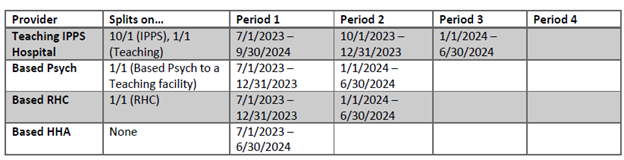
Given a Teaching Hospital with based Psych, RHC, and HHA subunits, and a Cost Reporting Period of 7/1/2023-6/30/2024, the default service periods would be as follows:
Supported FYEs:
- One-Click PS&R summary download functionality will provide fresh default PS&R Summary reports for cost reporting periods which meet all 3 of the following criteria:
- FYB is in the past
- FYE is no more than 3 years old
- FYE is not Finalized (e.g., NPR not issued)
- Supported FYEs will have fresh reports reflecting any changes to the PS&R data made available on a rolling basis according to the criteria and timelines in the following table:

- For FYEs that have aged out (i.e., older than 3 years) or have been Finalized, the reports will cease being updated and MCReF will retain the last copy for download
- For any reports not made available per the guidelines above (including Detail and Miscellaneous reports), users should continue to request those manually in the PS&R system
MCReF Homepage with One-Click PS&R Summary Report Functionality:
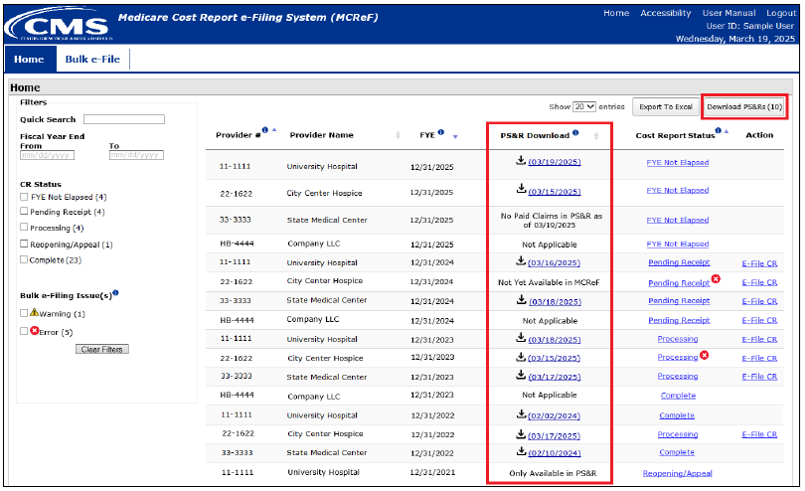
Depending on the eligibility of a given Provider and Fiscal Year (as described earlier), reports may be available in the PS&R download column. Availability of those reports and statuses regarding unavailable reports will always be shown via one of the following:
- Download icon and date: The download icon indicates that the Summary Reports for that Provider / FYE are available for download. The date shown is when the reports were last verified to be current. Clicking anywhere on the download icon or hyperlink will initiate the download.
- “Only Available in PS&R”: The PS&R Summary Report download is not available in MCReF. This will display when an FYE is not eligible (e.g., older than 3 years) and MCReF does not have a previous copy of the report available. Summary Report data for ineligible FYEs and any other PS&R reports (Miscellaneous/Detail) will still be available in the PS&R system.
- “Not Yet Available in MCReF”: A PS&R Summary Report download has not yet been generated. This will display when the Provider / FYE is eligible for PS&R Summary Reports and paid claims are available in PS&R for the given year, but One-Click Summary Reports have not been generated yet.
- “No Paid Claims in PS&R as of <date last confirmed there were no claims>”: The PS&R Summary Report is not yet available. This will display when no paid claims were present in PS&R for the Provider and FYE as of the date displayed in the status.
- “Not Applicable”: The PS&R Summary Report download functionality is not applicable to the Provider and FYE. This will display for Home Offices / LPICs as they do not have paid claims.
MCReF One-Click PS&R Summary Report Download & Outputs:
The following download pop-up will display once the download hyperlink is clicked for any Provider/FYE row:
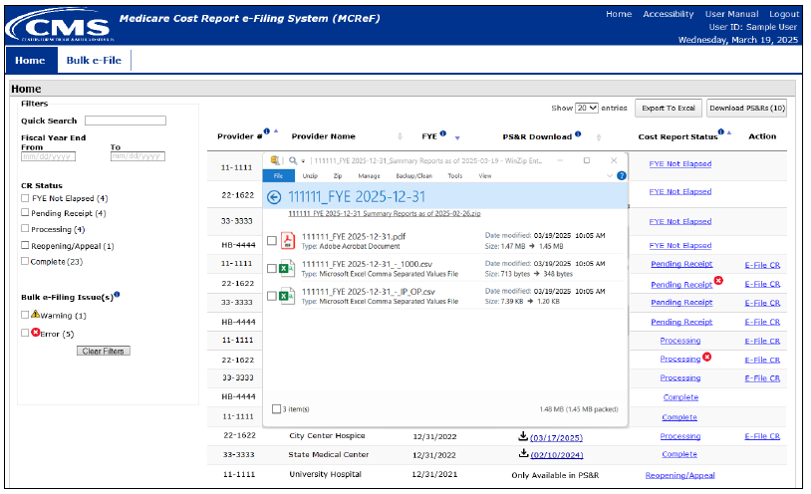
The reports contained within the ZIP file being downloaded are the same reports that can be acquired in the PS&R system. However, the cover page displayed in the Summary PDF is intentionally different than the cover page in Summary reports requested from the PS&R system. The following is an example of a One-Click Summary PDF cover page and the first page of its corresponding PS&R report:
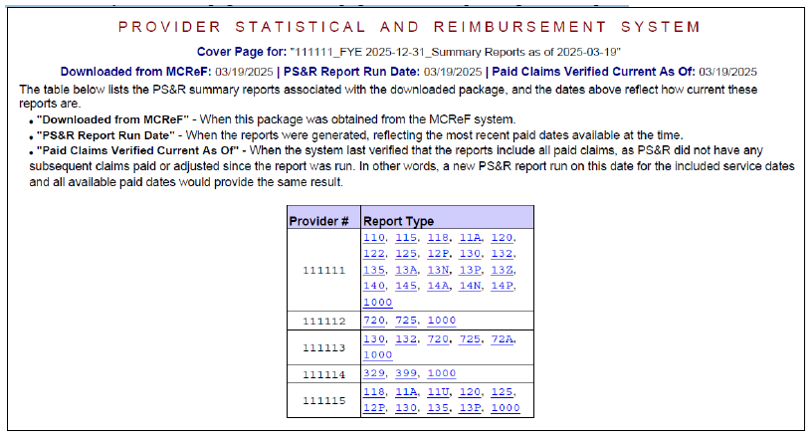
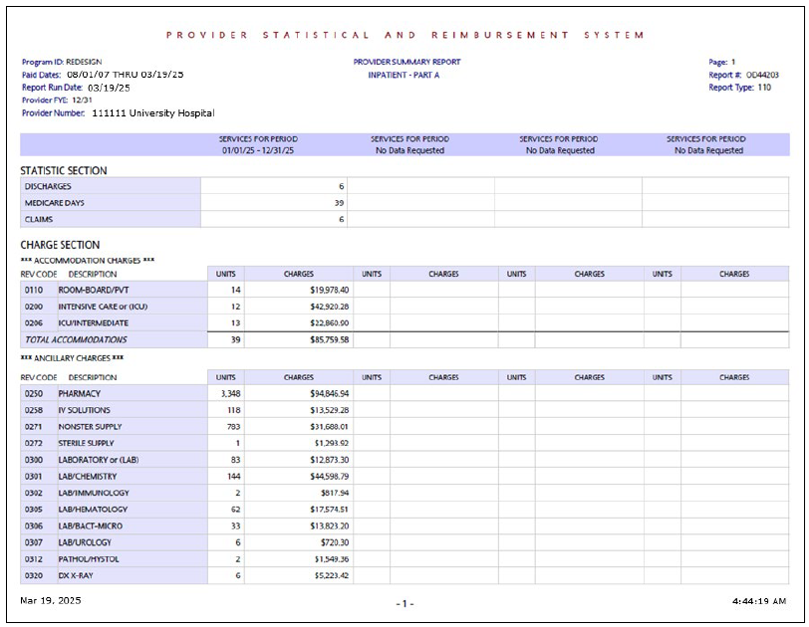
The system regularly checks One-Click PS&R Summary reports to confirm they are still up-to-date with new claims and any relevant changes to providers, and reflects the most recent day the system confirmed the report was still current as the "Paid Claims Verified Current As Of" displayed on the cover page. The following table presents several scenarios and the corresponding interpretation that users can make based on the dates presented, assuming the reports were downloaded today:
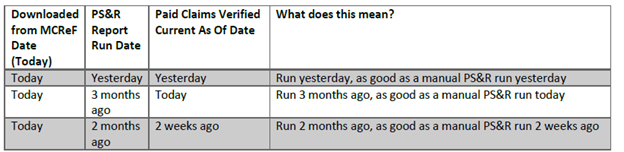
Bottom-line: The “Paid Claims Verified Current As Of” date always means that the report provided is as current as a PS&R report run on that date.
Cost Report Instructions:
- Currently, multiple cost report forms require the entry of the paid-through date from the PS&R Reports used to prepare the Medicare Cost Report.
- As of the issuance date of CR14351, the CMS Division of Cost Reporting is in the process of updating those forms to clarify that this new “Paid Claims Verified Current As Of” date, if present, should be used in place of the paid-through date.
- As an example, the Hospital 2552-10 has already been updated as follows:
- “Was the cost report prepared using the PS&R Report only? If either column 1 or 3 is yes, in columns 2 and 4, from the PS&R used to prepare this cost report, enter the “Paid Claims Verified Current Date As Of” date, if present, or the paid-through date. (see instructions)”
Troubleshooting & Assistance
Please email J15cracceptance@cgsadmin.com for the following:
- You reviewed the Troubleshooting section of the MCReF User Manual and aren't able to resolve an error received during the submission process.
- You submitted a cost report in error before your cost report due date. Email us as soon as possible. Include a request to void the submission, provider number, FYE and MCReF e-filing ID.
- MCReF submission errors, including fiscal period beginning and end dates, or sub-provider issues.
For issues with EIDM access, please contact the EIDM help desk: 866-484-8049.
CGS won't grant an extension due to MCReF submission issues. If you experience issues with MCReF, mail your cost report to us.
Last Reviewed: 07.17.2026
 Join Electronic Mailing List
 Print
Print Bookmark
 Facebook
 YouTube
 LinkedIn
 CGS Medicare Mobile App