



Profile Verification
To meet CMS security guidelines, all users must verify that the information on his/her profile is accurate and current. This process is required every 250 days. myCGS tracks this timeframe to ensure this task is completed.
NOTE: If you have multiple accounts and IDs and selected one as your Super ID (see Account Linking), Profile Verification is performed on just the Super ID and not the accounts linked to the Super ID.
- As the verification period approaches, upon login, myCGS will notify you to verify your account. The pop-up message provides instructions on how to complete this task.
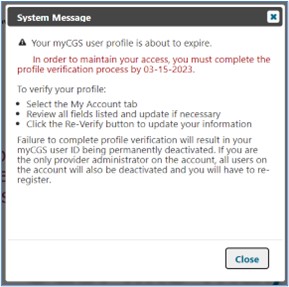
- From the “My Account”tab, review the information on your “myProfile”sub-tab to ensure all is accurate and current. Make changes as needed.
- Click "Re-Verify"to confirm all is correct.

- You will be prompted to review and accept the myCGS Terms of Use.
- Once accepted, the counter will restart at 250 days.


 Join Electronic Mailing List
 Print
Print Bookmark
 Email
Email Facebook
 YouTube
 LinkedIn