



September 29, 2025
myCGS 10.3 Available Now!
We released myCGS 10.3 on September 18!
In this version, we’ve made several enhancements to Overpayment Recovery features, gave Designated Approvers (DAs) the ability to update End User emails, and fixed several known issues.
New Features/Enhancements
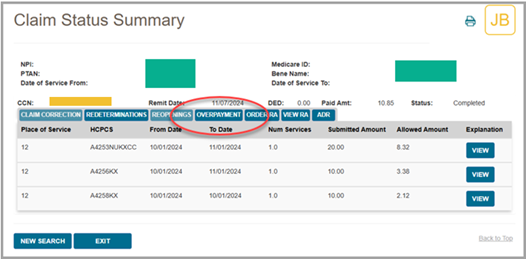
- The Claim Status Summary Screen now has an overpayment button. This button lets you start an overpayment request directly from this screen.
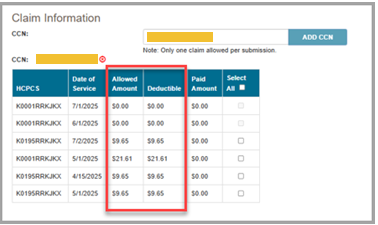
- The OPR Request Submission Form now shows the allowed and deductible amounts applied to a claim in the Claim Information section.
- On the OPR Request Submission Form, if you select a claim line that's denied or still in process, you'll now see a message saying the claim isn't eligible for overpayment recovery.
- On the Overpayment Recovery Search screen, you now can:
- View the dollar amounts with plus or minus signs depending on the type of offset under the Offset Details section.
- View additional Financial Details for a specific AR/Invoice Number in the Overpayment Invoice Details screen when searching by Letter Number.
- View the AR status and date when searching by Letter Number.
- Access UPIC Extrapolated Overpayment letters on the Overpayment Recovery Search screen when searching by Letter Number.
- Designated Approvers (DAs) can now update their End Users email addresses. End Users will receive an email notification when their address is changed.
Fixes
- We fixed the Review Results link on the ADR Summary screen for post-pay ADR details.
- We resolved an issue where some DAs were unable to recertify their End Users through the User Management screen.
Feedback Button
Do you have any ideas you'd like to see implemented in myCGS? Use the "Feedback" button found in our web portal to let us know!
 Join Electronic Mailing List
 Print
Print Bookmark
 Facebook
 YouTube
 LinkedIn
 CGS Medicare Mobile App