




EDI: How Do I…?
I need help understanding the 277CA rejection that I received.
The 277CA Edit Lookup Tool allows Trading Partners, billing services, providers, and clearinghouses to view easy-to-understand descriptions associated with the edit code(s) returned on the 277CA – Claim Acknowledgment for 5010A1 claims. The tool allows you to enter the edit codes and will return possible explanations for the cause of the edit.
Step 1: Access the 277CA Edit Lookup Tool
Step 2: Enter the edit information located in the STC segment or reported on your acknowledgment file into the 5010A1 277CA Edit Lookup Tool
Step 3: Click Submit
Example: STC*A7:562:85**U*1983˜
A7 = CSCC (Claim Status Category Code)
562 = CSC (Claim Status Codes)
85 = EIC (Entity Identifier Code)
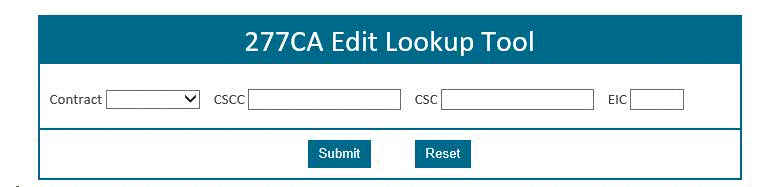
The results will be returned below the search fields and will display all possibilities for the cause of the edit.
For additional instructions, please refer to 277CA EDI Edit User Guide
How do I verify DDE/PPTN enrollment?
Step 1: |
Complete the J15 DDE PPTN Application/Reactivation form. |
Step 2: |
Fax in the completed application. The Fax numbers are located on the bottom of the form. |
Step 3: |
J15 EDI will complete the DDE PPTN enrollment process within 20 business days. |
Step 4: |
A confirmation e-mail will be sent to the EDI contact on the application |
Step 5: |
If you do not receive a confirmation email, please reach out to the Help Desk at: Ohio/Kentucky Part B – 1.866.276.9558 (option 2) |
 Join Electronic Mailing List
 Print
Print Bookmark
 Facebook
 YouTube
 LinkedIn
 CGS Medicare Mobile App