



Remittance Look-Up
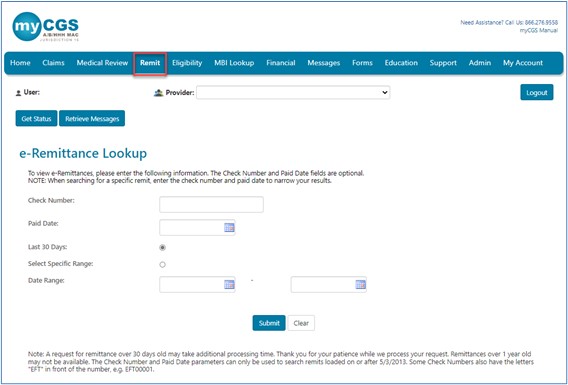
To access your remittances:
- Select the "Remittance" tab. The "Remittance Look-Up"page will display.
- You may search by:
- Check number
- Some check numbers may begin with letters, e.g., "EFT" for Electronic Funds Transfer.
- Paid date in the MM/DD/YYYY format (or use the calendar icon)
- Remittances issued within the last 30 days (which is default)
- Date range
- Click the "Select Specific Range" option and enter a date (MM/DD/CCYY format) in the "Date Range" field(s).
- The date range will default to 45 days from the beginning date.
- You can choose a shorter date range, but you cannot choose a date range of more than 45 days.
- Check number
NOTE: Remittances are readily available for approximately one year. If you need to retrieve remittances that are older than one year, myCGS may experience a delay. CGS does not guarantee access to remittances that are older than one year
Once you have chosen the search option for remittances you want to view, click "Submit."

 Join Electronic Mailing List
 Print
Print Bookmark
 Facebook
 YouTube
 LinkedIn