



mySecurity
During the registration process, you were prompted to select six questions and provide answers to those questions. The purpose of the questions is to validate your identity should you forget your password and need to reset and choose a new one.
Under the "mySecurity"sub-tab, you may change the questions you selected originally and provide new answers.
- Click the drop-down box for any question you would like to change. Once you find a question that applies to you, select it. Enter the answer in the "Answer" field.
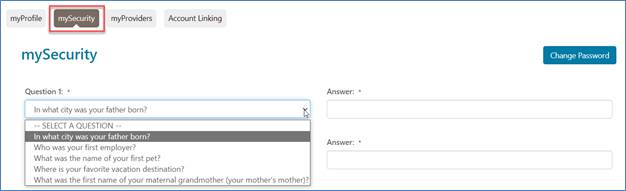
NOTE: There are a total of six validation questions, so be sure to complete all six question and answer fields. Click "Save" when finished.

 Join Electronic Mailing List
 Print
Print Bookmark
 Email
Email Facebook
 YouTube
 LinkedIn