



Account Recertification
To ensure all myCGS users are compliant with updated Centers for Medicare & Medicaid Services (CMS) security requirements, account recertification is required to be completed by the Provider Administrator. This task must be completed every 360 days.
Notification pop-up messages will display upon login within 47 days of the date recertification is due.
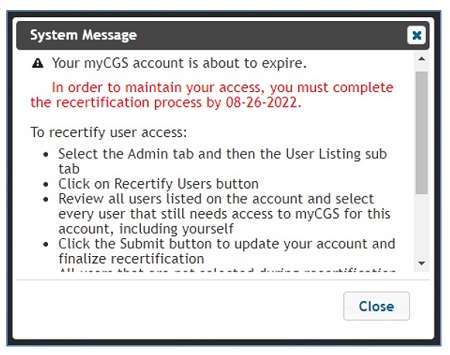
Also, email notification will be sent to you starting day 20 of the date recertification is due.
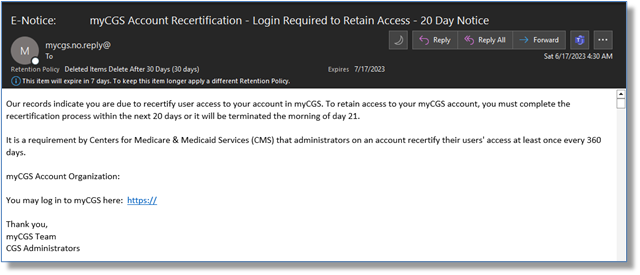
Failure to complete the process timely will result in an interruption of service, including deactivation. The user cannot access myCGS until the recertification is completed.
This process applies to the Provider Administrator as well.
To recertify an account:
- From the User Listing sub-tab, scroll to the bottom of the page and select the “Recertify Users” button.
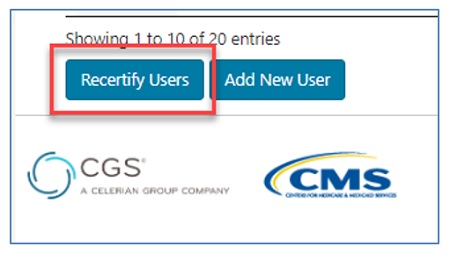
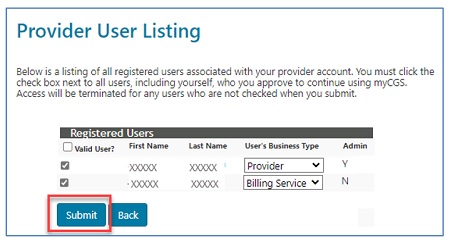
- The Registered Users list will display. Check the box of the user(s) you are recertifying. Multiple users may be selected if necessary. Once selected, click "Submit." Note that those not selected will be terminated.
- A message will display, asking you to verify you are recertifying the selected users.
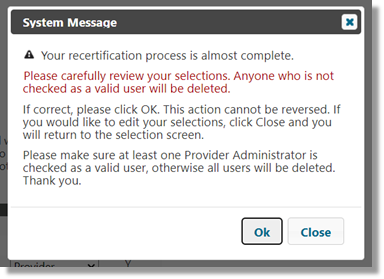
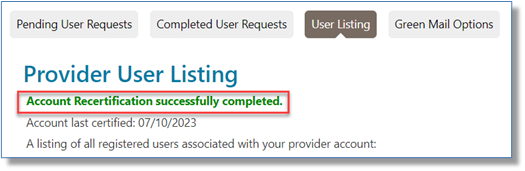
- Once confirmed by clicking "OK," a message will display.
- Before gaining access to myCGS, the user may have to review the Terms and Conditions and, if in agreement, check the box and click "Submit."
NOTE: These steps also apply if the Provider Administrator is recertifying his/her own access to myCGS.

 Join Electronic Mailing List
 Print
Print Bookmark
 Email
Email Facebook
 YouTube
 LinkedIn